Mealcam
Our Vision
During our very first hackathon, Bern Häckt, we faced a challenge by Transgourmet: our task was to make meal prep smarter, more efficient, and easier.
Our solution: Mealcam.
In the first hours of the hackathon, we developed an outline for a new mobile application. Our idea was to reduce the time people spend searching for a suitable meal that matches the contents of their fridge. We planned to implement a vision AI that would scan the available ingredients and suggest meals based on them.
Additionally, Mealcam should support proven basic features such as a planner, profiles, and more. The entire project had to be realized in just 48 hours. It was important to us to show that an application like Mealcam is actually feasible and could improve people’s efficiency in everyday life. To achieve this, we needed to create a scalable and functional mobile application that implemented our ideas in a basic form.
Challenges
As soon as our idea had a solid foundation, we started with the actual implementation of Mealcam. First, we developed a roadmap to enable a fast and efficient workflow later on. During this process, we realized what challenges were awaiting us:
- Implementation of a Vision AI
- Development of a mobile application
- Implementation of a meal database
- Connecting all components: setting up a server
These were the main items we had to work on, each with several subtasks:
Configuration of our Server
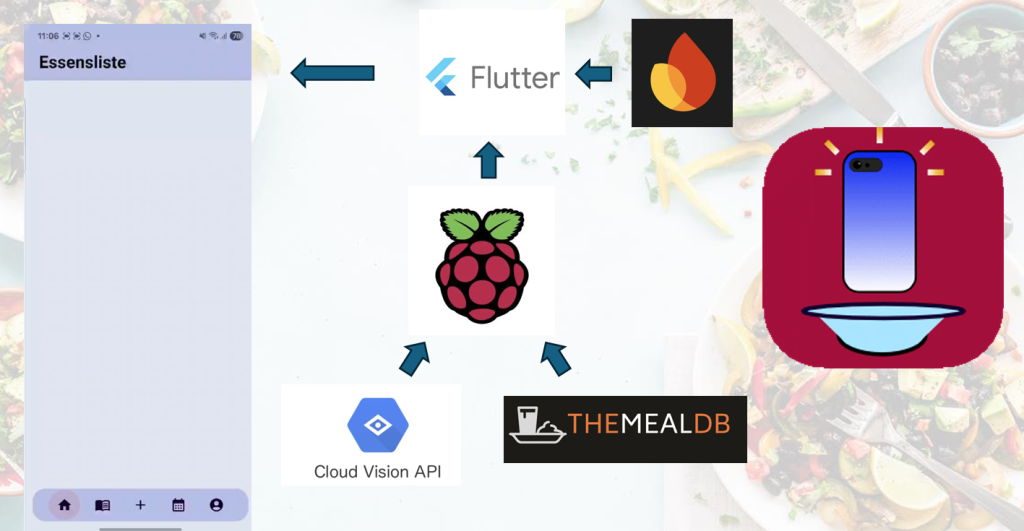
Our solution was supposed to be scalable. Therefore, we implemented our own server using a Raspberry Pi 5, which served as the backbone of our project. The server had to connect the AI, the meal database, and the mobile app. The configuration went well, even though it was sometimes a bit annoying. Over the course of the hackathon, we set up a Python Flask server that was able to manage all communication within our project.
Implementation of a Vision AI
The main feature of our app was the ability to register ingredients using only a camera. Thus, it was crucial that this worked reliably. After some research, we decided to use the Google Vision AI API to realize our idea. The AI had to be configured and later connected to Mealcam. The configuration itself was done rather quickly: the Vision AI received an image, processed it, and provided an output. It was basically that simple. However, before this could happen, the image had to be captured and sent to the AI, and the output needed to be filtered, processed, and displayed inside Mealcam.
Development of Mealcam
The mobile application we developed during this hackathon was our final product. Everything else we built existed to support it, so all components had to be connected to it. These connections were routed through our server. The mobile application itself was written using the Flutter SDK, an open-source UI development kit for creating cross-platform applications. User data, such as their meal plan, was saved to a database. In our case, Google Firebase.
Implementation of a Meal Database
Mealcam was supposed to recommend suitable meals, which required access to a large database of different dishes. We connected Mealcam to TheMealDB API, which offers an extensive collection of meals for free. The server managed all traffic: it scanned for meals based on ingredients and recommended matching dishes. This logic was implemented in Python.
Connection
All of the features described above had to be linked correctly, which was the task of our server. Pictures of food were captured in the mobile application and sent to the server. The server forwarded them to the Vision AI, which processed the images. The results were transferred back to the server, filtered, and displayed in Mealcam, where they were also saved to the database. If the Vision AI detected food, the server searched the meal database for matching recipes. The top matches were then sent back to Mealcam and displayed there.
Our Achievements
After 45 hours of coding, we had to hand in our final result. We had a working application, and the data transfer described above worked properly. For example, we were able to scan our midnight snack (pizza), have it displayed in the app, and receive recipe recommendations based on it (which was admittedly rather useless for pizza). The only thing left was to pitch our project.
Impact of Mealcam
Of course, Mealcam is not ready for the industry yet. But it clearly shows how it is possible to scan the contents of a kitchen using modern technologies, thereby reducing the time people spend figuring out what to eat next. We hope that in the future, more sophisticated applications will be able to implement our vision on a larger scale, helping people in their everyday lives.
Download the presentation and technical documentation: